LIMS instrument integration: data in, results out, no re-typing
Every machine in a test lab already exports a file. LIMSey takes it from there: paste it, let Instrument Import pick it up from the export folder and review every row, or send it through the API — then get results back out to reports, Power BI, and the people who asked for the test.
How LIMS instrument integration actually works in a test lab
Not drivers and middleware — three practical ways to move a results file from the instrument PC into the sample record, matched to how often you run the test.
Paste from Excel or Sheets
Open the export, copy the block of cells, paste it into the results table. Rows and columns land on the right samples. The right answer for tests you run a few times a week, and it's included in every seat.
Instrument Import, with review
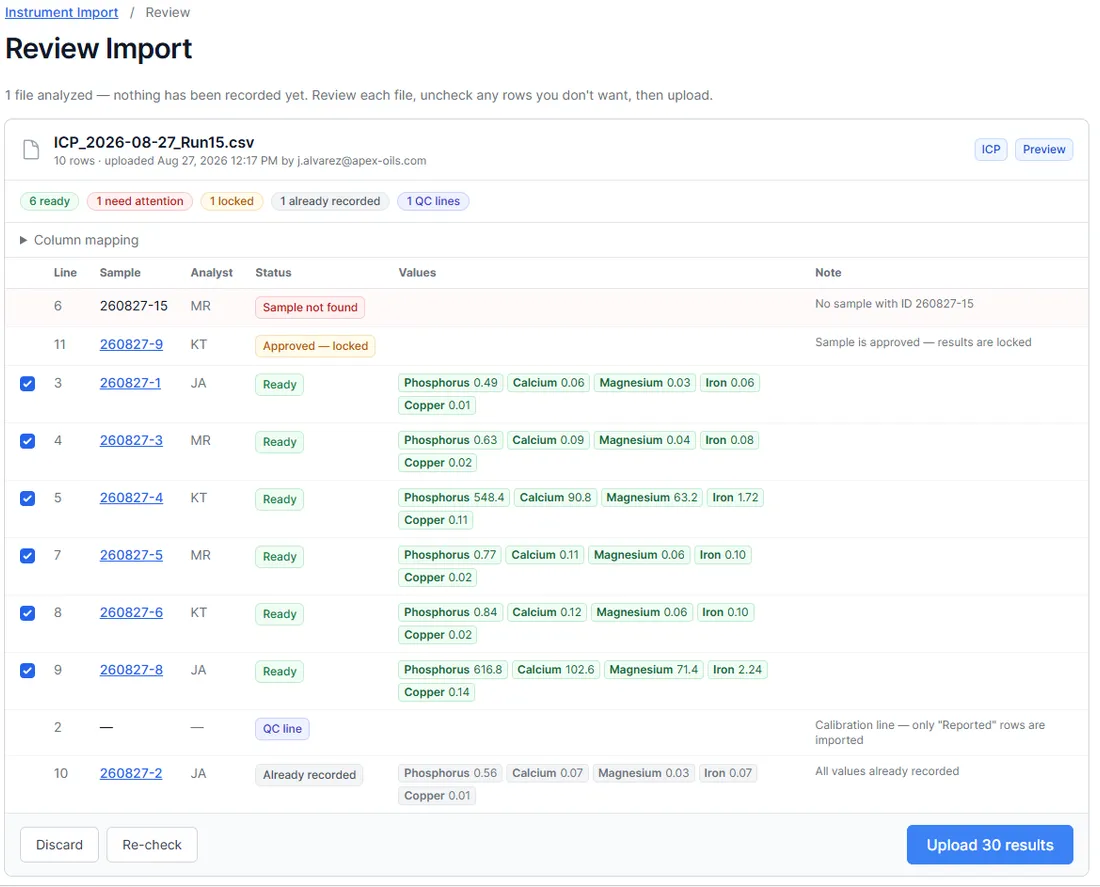
Point the Instrument Import page at the folder your instrument software exports to and new files show up on their own — or just drag one in. Every row is checked before anything is recorded — sample found, already recorded, approved-and-locked, calibration lines set aside — then one click uploads the rest. The original file is attached to the import as the permanent record. Built per instrument and export format; an upload script covers instrument PCs that can't open a browser.
REST API
For rigs you already script — LabVIEW, DEWESoft, a Python harness — push results directly with a scoped token. Store the full instrument payload (JSON or XML) against the result in a data-blob field, so the raw curve stays with the number.
Built and in use: ICP and NIR
Two customer labs asked for the same thing — results from their ICP landing on the right samples without anyone re-keying element concentrations — and one of them runs a bench of three FOSS NIR analyzers (DS3, DS3 F, DS2500 L) and a CDR FoodLab through the same import. So we built it. The analyst exports the run, drags the file in, and sees every row's status before anything is recorded: six ready, one sample not found, one already recorded, one approved and locked, the calibration line set aside. One click uploads the rest.
- The human review stays in front of the commit — nothing is recorded until the analyst says so
- Rows that would collide — sample not found, already recorded, approved and locked — are held back automatically; QC and calibration lines are recognized and skipped
- Same pattern applies to any instrument that exports a file — scoped and quoted up front
What we don't do: serial or driver-level connections to instruments, and we won't pretend a parser exists before we've seen your export. Bring a sample file to the demo.
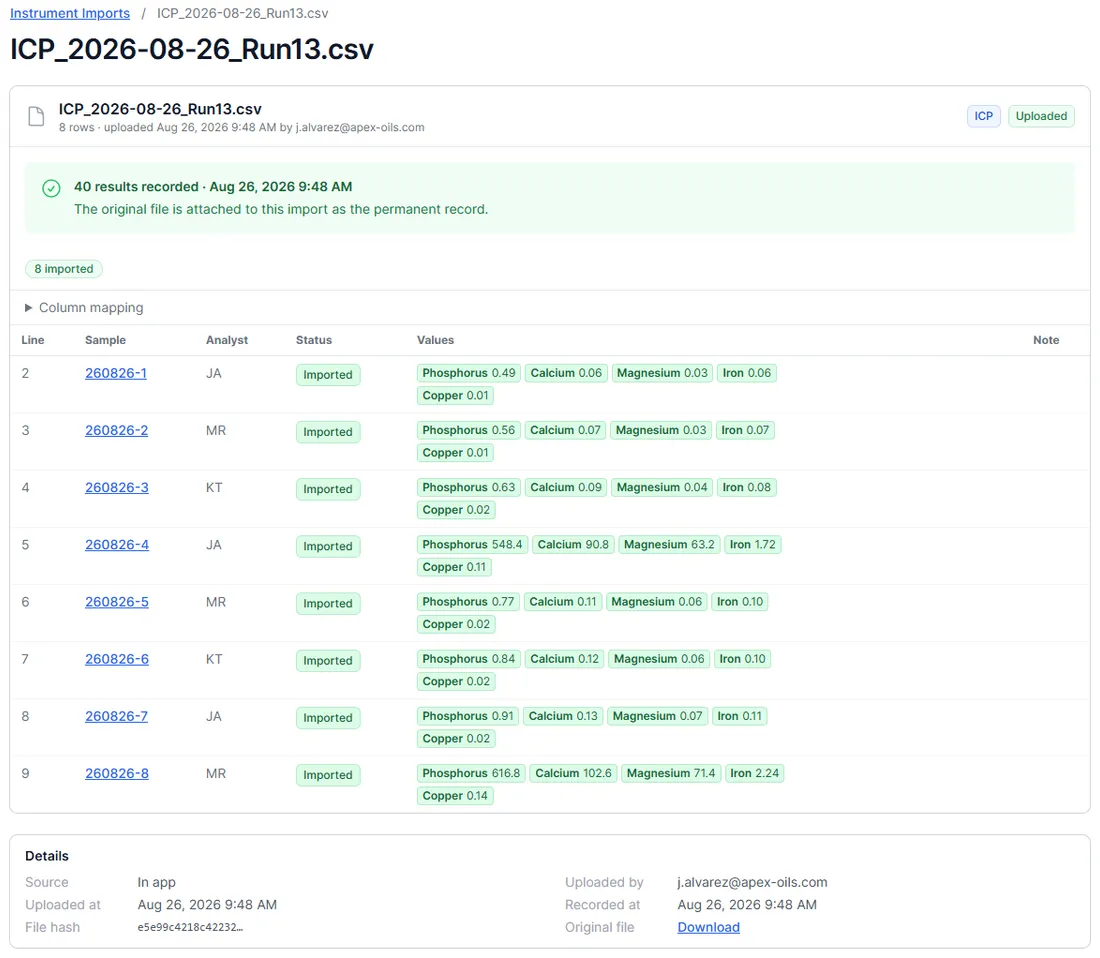
Every import is a permanent record
After upload, the import keeps everything an auditor will ask for: which file, its hash, who uploaded it and when, which samples received which values, and the original file itself — downloadable, attached to the import for good. Uploads from an instrument PC via the script show up in the same log as the ones done in the app.
- Original export attached to the import, with its file hash
- Recent-imports log: date, file, instrument, who, results, status
- Raw-data retention and traceability for ISO 17025 handled as a side effect
What each machine exports, and how it gets in
Patterns, not drivers. Each integration is scoped to the export your instrument software actually produces.
| Instrument | Typical software | What it exports | How it gets into LIMSey |
|---|---|---|---|
| ICP-OES / ICP-MS | Agilent ICP Expert, Thermo Qtegra, PerkinElmer Syngistix | CSV / Excel per run | Instrument Import with row-by-row review — built, in use |
| NIR analyzers | FOSS ISIscan Nova (DS3, DS3 F, DS2500 L) | CSV / Excel of predicted constituents per sample | Instrument Import with row-by-row review — built, in use |
| CDR FoodLab analyzers | CDR FoodLab software | CSV / Excel per sample (FFA, peroxide value, moisture…) | Instrument Import with row-by-row review — built, in use |
| Tensile & compression frames | Instron Bluehill, MTS TestSuite, Shimadzu Trapezium | CSV / Excel results, PDF report, raw curve | Paste, or Instrument Import scoped to the export; keep the curve as an attachment |
| Hardness testers | Wilson, Buehler, Mitutoyo | CSV, or a keyboard-wedge reading | Paste straight into the results table |
| CMMs & dimensional | PC-DMIS, Calypso, Mitutoyo U-WAVE gauges | Inspection report, CSV, wedge input | Instrument Import for reports; paste for gauges |
| Environmental chambers & ovens | Watlow, ESPEC, Thermotron loggers | Time-series data logs | Attach the log to the task; summarize key values as results |
| DAQ & custom rigs | NI LabVIEW (TDMS), DEWESoft, Keysight | CSV / TDMS, often scripted | REST API from your own script; full payload in a data-blob field |
Instrument names are for identification only; LIMSey isn't affiliated with these manufacturers.
Want the long version? Read the guide:LIMS integration with lab instruments
An API your developer can use on day one
Scoped, self-service tokens are created in Settings — one per script or system, limited to what it needs, revocable on its own. The API has grown release by release alongside customer integrations, and it's included in every seat.
- Jobs — create, copy, update status, and read job fields
- Tasks and results — create tasks, write results in bulk, attach instrument payloads
- Samples — create, modify, and query specimens and their history
- Materials, job templates, and task templates
- Training records (read-only) for compliance reporting
- List endpoints and data-sync for keeping another system current
- Rate limits answered with proper 429s so integrations back off cleanly
Data-blob results
Keep the whole instrument payload — JSON or XML — on the result, not just the number.
Bulk updates
Write results for a whole run in one call; list endpoints and data-sync keep other systems current.
Scoped tokens
Self-service in Settings, limited per integration, revoked without touching anything else.
Audit trail included
Changes made through the API are tracked like any other — who, what, when.
Power BI, reports, and answers for leadership
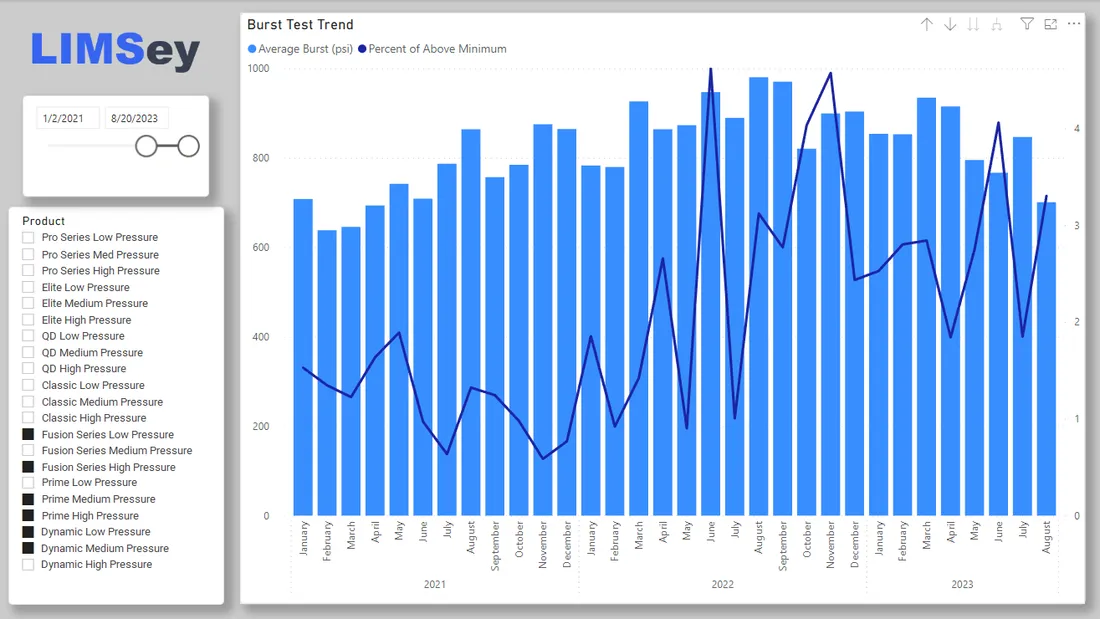
Once results live in LIMSey they stop being stuck in a folder on the instrument PC. Reports and certificates generate with one click, built-in Metrics covers the standard lab KPIs, and for the questions your leadership actually asks we build custom Power BI dashboards on request — starting from our templates, shaped to your products and tests.
- One-click test reports as PDF or Excel
- Export any results table to Excel
- Built-in Metrics with zero setup; custom Power BI dashboards built for you
- AI Assistant — ask your lab data a question in plain English
Fits the systems your company already runs
SAML single sign-on
Works with Okta, Microsoft Entra ID, and other identity providers. Two-factor authentication with backup codes and configurable password policies are built in. Details on the security page.
Public request forms
Take test requests from anyone — an engineer in another plant, a supplier, a customer — through a shared link, no account required. Conditional sections show only the fields that apply. See test requests.
US-hosted, backed up, audited
Data stays in US data centers with daily backups and a complete audit trail on every record, whether it arrived by hand, by upload, or by API. SOC 2 Type II is in progress.
Integration questions
Can LIMSey connect to my lab instruments?
Yes, through the instrument's own export. Nearly every machine in an engineering test lab — tensile frames, hardness testers, CMMs, chambers, DAQ rigs, ICP — already writes a CSV, Excel, or report file. LIMSey takes that file in three ways: paste it straight into the results table, let the Instrument Import page watch the export folder (or drag the file in) and review every row before anything is recorded, or push it through the REST API from your own code. Instrument Import is built per export format — it's live for ICP-OES/MS, FOSS NIR, and CDR FoodLab analyzers today, and we scope other instruments the same way. We don't do serial or driver-level connections to instruments.
Does LIMSey have an API?
Yes. A REST API with scoped, self-service tokens covers jobs, tasks, results (including bulk updates), samples, materials, templates, and training records, plus list and data-sync endpoints for high-volume integrations. Tokens are created and revoked by your admins in Settings, and each one can be limited to just what a script needs.
Does LIMSey work with Power BI?
Yes. LIMSey's data can feed Power BI or another BI tool, and we design and build custom dashboards on request as part of implementation — burst-test trends, pass rates by product line, turnaround by requester, whatever your leadership asks for. Built-in Metrics covers the standard lab KPIs without any setup.
Do you support single sign-on?
Yes. SAML 2.0 single sign-on works with Okta, Microsoft Entra ID, and other identity providers, alongside two-factor authentication with backup codes and configurable password policies.
What does an instrument integration cost?
It's scoped and quoted up front, like any implementation work, and it is sometimes zero — pasting from Excel and the REST API are included in every seat. Instrument Import for a new instrument type depends on the export format; if it matches one we've already built, it's quick. Seat pricing itself is published on the pricing page.
Bring an export file to the demo
Show us what your instrument software produces and we'll walk through exactly how it lands on the right samples.