Spreadsheet Kit for Small Test Labs
A free Excel kit for small in-house test labs: a job log, a test request form, a test data sheet with printable results, and a calibration tracker, plus the folder system that ties them together.
Not every lab needs a LIMS yet. With one or two people and a handful of requests a month, a well-kept spreadsheet and a tidy shared folder can carry you a long way. This kit sets that up properly: every job gets an ID in one Job Log, every job gets a folder named after it, and the forms use the same IDs, so everything about a job is one click from the log.
Download the kit
Excel workbooks in a .zip, 168 KB. Built for Microsoft Excel, with no macros. No email required.
A Job Log that answers "where's my test?"
One row per job, and the Job ID the rest of the kit hangs off. Summary boxes show open jobs, overdue jobs, average turnaround, and the next Job ID to use. Overdue jobs turn red, and every row links straight to its job folder.
An Equipment tab tracks calibration intervals and shows what's due soon, overdue, or out of service, so you check one place before testing.

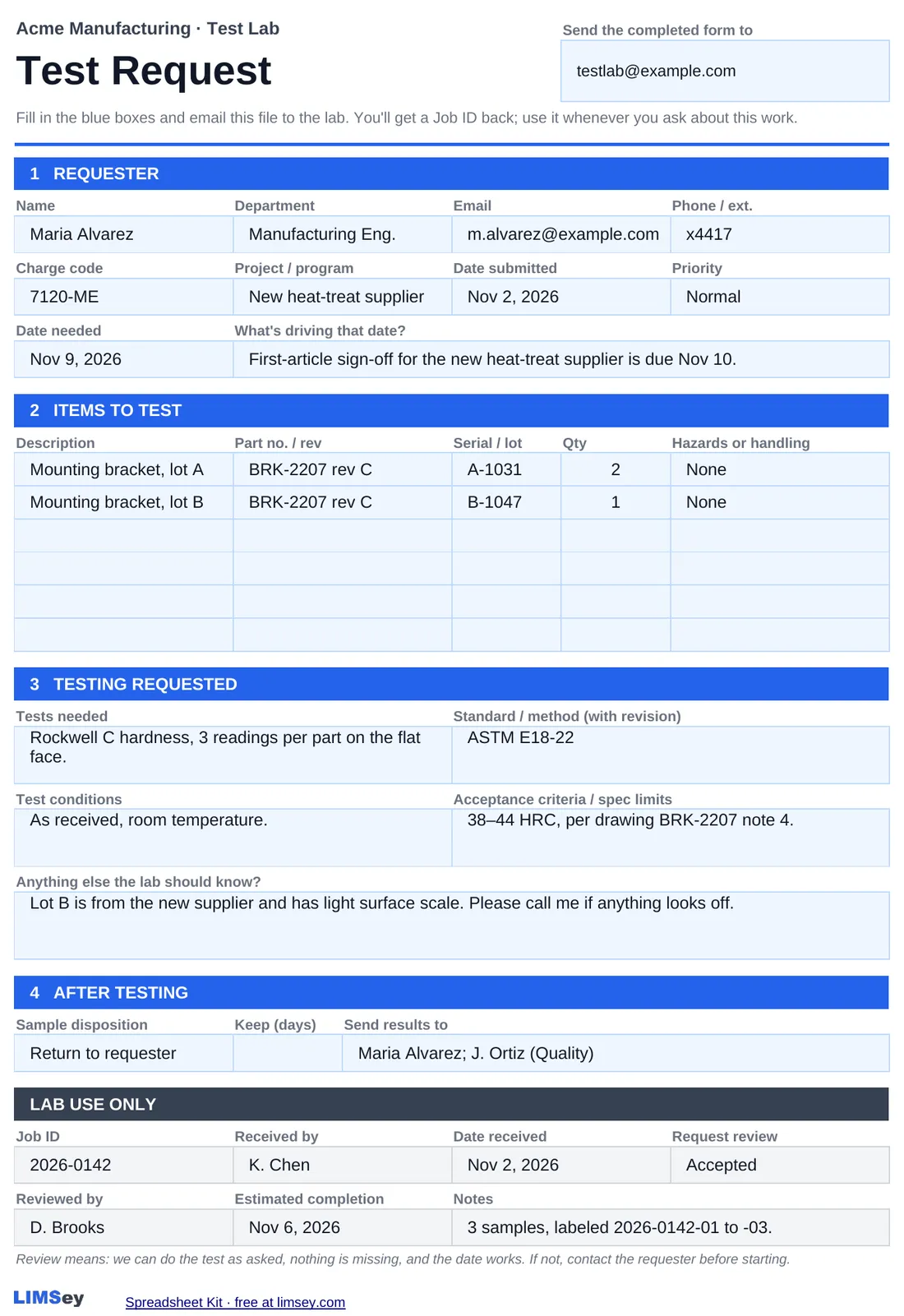
A test request form that gets the details up front
Requesters fill in what the lab needs before work starts: the samples, the standard with its revision, acceptance criteria, the date needed and why, and what happens to the samples afterwards.
A Lab Use Only box records who received the request and whether it was reviewed and accepted, so questions get asked before testing starts, not halfway through.
A test data sheet that does the math
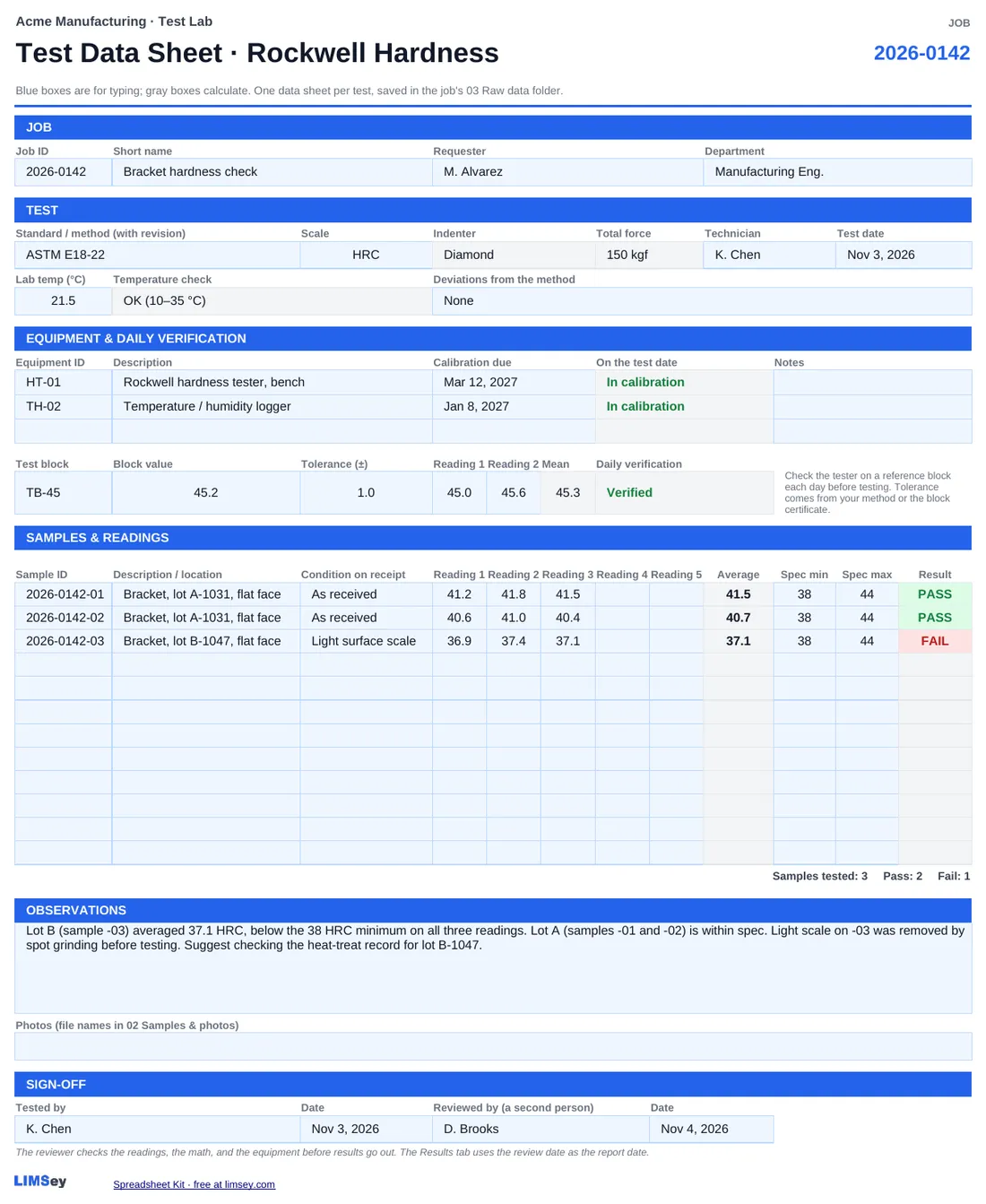
The example is Rockwell hardness. Pick the scale and the indenter and force fill in. Readings average themselves, and each sample gets PASS or FAIL against its spec.
The sheet flags equipment whose calibration lapsed before the test date, a lab temperature outside the allowed range, and a daily verification that's out of tolerance. For other tests, copy it and change the readings table.
Results that print as the report
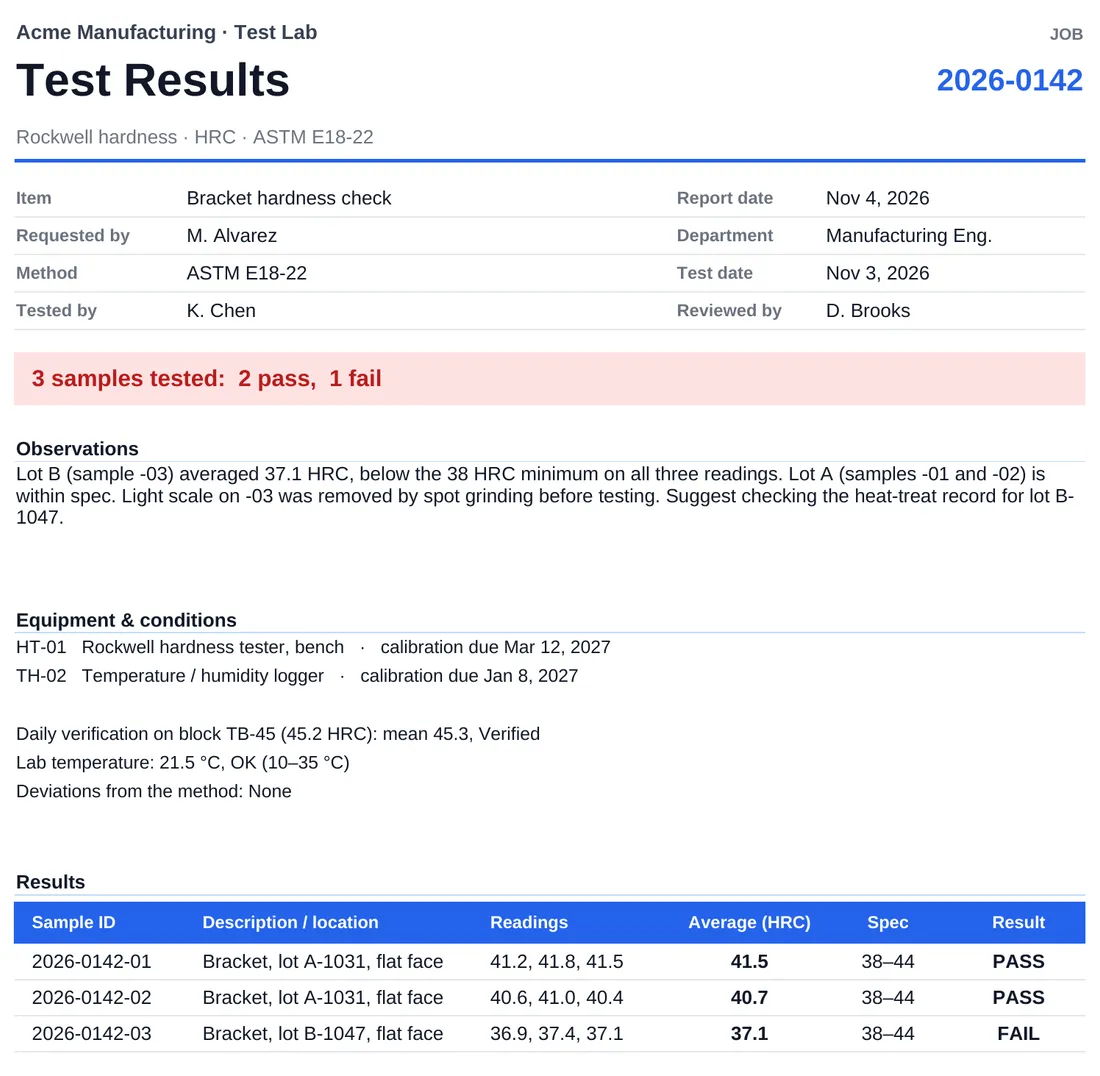
The data sheet's Results tab is a one-page report: a pass/fail summary, observations, equipment and conditions, and the results table. Print it to PDF into the job's report folder and send it. Nothing gets typed twice.
What's in the zip
Job Log.xlsx                          Jobs, Equipment, and Settings tabs
Forms\
  Test Request.xlsx
  Test Data Sheet - Hardness.xlsx
Jobs\
  _TEMPLATE\                          copy this for each new job
    01 Request\   02 Samples & photos\   03 Raw data\
    04 Analysis\  05 Report\             06 Correspondence\
  2026\
    2026-0142 Bracket hardness check\  a finished example job
Equipment\                            calibration certificates
The 2026 rows and the example job show how it all fits together. Delete them when you're ready to start.
Set it up in ten minutes
- Extract the zip before opening anything. On Windows, right-click it and choose Extract All. Opening files from inside the zip breaks the folder links.
- Move the folder to your shared drive. If you use Microsoft 365, SharePoint or Teams is better: several people can edit the Job Log at once, and version history undoes mistakes.
- Open Job Log.xlsx and click Enable Editing. Excel asks because the file came from the internet. There are no macros.
- Follow the Start Here tab. Set your lab name, edit the drop-down lists, and put your lab's name at the top of the forms.
When you'll outgrow it
A spreadsheet kit works until the lab gets busy. The usual signs:
- Requesters regularly email or stop by to ask where their test is.
- More than one person needs to update the Job Log all day long.
- "When did we last test this part?" means opening folders one by one.
- Promised dates are guesses because nobody can see the whole queue.
- Calibration due dates get noticed after they've lapsed.
- Getting ready for an audit takes days of pulling records together.
Any two of these, and the spreadsheets are probably costing more than software would. LIMSey runs requests, jobs, samples, scheduling, equipment, and reports as one system built for test labs.
When the spreadsheets start costing you time
LIMSey keeps requests, jobs, samples, scheduling, and equipment in one system, with status your requesters can check themselves.